macOS Menu Bar App
Your VPN's
safety net.
NetGuard monitors your VPN connection in real time and instantly blocks all internet traffic the moment it drops. No leaks. No exposed IP. No exceptions.
- Firewall-level kill switch blocks all traffic instantly
- Real-time IP monitoring with change alerts
- Works with any VPN — WireGuard, OpenVPN, IKEv2
- Live bandwidth tracking and history
macOS 13+ · Apple Silicon & Intel · Annual or Lifetime licence
Features
Everything you need to
stay protected.
NetGuard is a lightweight macOS menu bar network monitor that watches your VPN connection and responds instantly when something goes wrong.
Firewall-Level Kill Switch
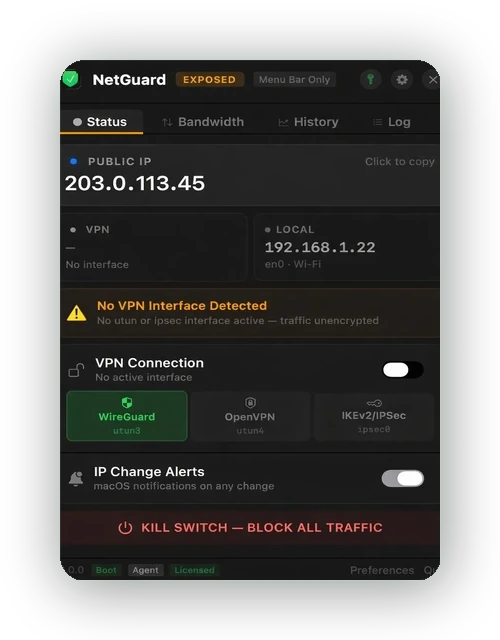
When your VPN drops, NetGuard activates the macOS pf firewall to block all outbound traffic — not just browser traffic, every app on your system. No data leaves your Mac until the VPN reconnects.
Real-Time VPN Monitoring
Continuous monitoring of your active network interfaces detects WireGuard, OpenVPN, and IKEv2/IPSec tunnels. See your VPN status, protocol, server, and interface at a glance — the best VPN monitoring tool for Mac.
IP Address Dashboard
View your public IP, VPN IP, and local IP in one dashboard. Colour-coded by protocol with click-to-copy. An exposure warning appears immediately when no VPN interface is detected.
IP Change Alerts
Every IP address change is logged with a timestamp. Receive macOS notifications the instant your public IP changes — whether from a VPN drop, network switch, or server rotation.
Live Bandwidth Monitor
Track upload and download speeds in real time with a live graph. View current, average, and peak transfer rates. The real-time bandwidth monitor for Mac you've been looking for.
Menu Bar Native
NetGuard lives in your macOS menu bar — always one click away. Choose compact icon-only mode or detailed mode showing your VPN status and IP address. The ultimate macOS menu bar network monitor.
How It Works
Protected in three steps.
Install
Download the signed DMG, drag NetGuard to Applications, and launch. It appears in your menu bar and starts monitoring immediately.
Monitor
NetGuard detects your VPN protocol, tracks your IP addresses, and logs bandwidth — all running silently in the background with zero configuration.
Stay Protected
If your VPN drops, the kill switch activates instantly — blocking all traffic at the firewall level until your connection is restored. Your real IP is never exposed.
Pricing
Simple, transparent pricing.
Annual
1 domain · 1 install
Includes 365 days of updates & support
- Firewall-level kill switch
- Real-time VPN monitoring
- IP dashboard with change alerts
- Live bandwidth monitoring
- All VPN protocols supported
Lifetime
1 domain · 1 install · Lifetime licence
One-time payment · Includes 365 days of updates & support
- Everything in Annual
- Licence never expires
- Support renewal from $9.99
FAQ
Common questions.
Does NetGuard work with any VPN provider?
Yes. NetGuard monitors your network interfaces at the system level, so it works with any VPN app or protocol — WireGuard, OpenVPN, IKEv2/IPSec, and more. It doesn't replace your VPN; it watches over it.
How does the kill switch work?
NetGuard uses the macOS built-in pf (packet filter) firewall to block all outbound network traffic the moment your VPN disconnects. This is an OS-level block that covers every application on your Mac, not just your browser. Traffic is restored automatically when your VPN reconnects.
Does NetGuard collect my data or track my browsing?
No. NetGuard runs entirely on your Mac. It does not send any data to external servers, track your browsing, or collect analytics. All monitoring data stays on your device. The only network request the app makes is to check your public IP address via a standard IP lookup service.
Which macOS versions are supported?
NetGuard supports macOS 13 Ventura and later, and runs natively on both Apple Silicon (M1, M2, M3, M4) and Intel Macs as a universal binary.
Is NetGuard available on the Mac App Store?
NetGuard is distributed directly as a signed and notarised DMG from our website. The kill switch requires low-level firewall access that is not permitted under App Store sandboxing restrictions. The app is fully verified by Apple through the notarisation process.
What happens after my support period expires?
Both licence types include 365 days of updates and priority email support. The Annual licence renews each year; the Lifetime licence never expires — you keep using NetGuard indefinitely. After your support period ends, you can optionally renew for continued updates from $9.99, or simply keep using the version you have.
Contact
Get in touch.
Have a question, issue, or feature request? We'd love to hear from you.
Ready to protect your connection?
Download NetGuard and take control of your network privacy.
Buy Now — From $9.99